
📑 Table of Contents
- 📜 Scrolling Text LED Signs: What They Are, How They Work, Prices, and Selection Guide (2026)
- 📜 1. What Is a Scrolling Text LED Sign?
- Difference Between Scrolling Text and Fixed Sign
- 🔧 2. How Does a Scrolling Text LED Sign Work?
- 2.1. Core Components
- 2.2. How Does the Text Flow?
- 💻 3. Programmable LED Signs — What's the Difference from Scrolling Text?
- 3.1. Programmable LED Signs
- 3.2. Scrolling Text LED Signs
- 3.3. Which Suits You?
- 📏 4. Scrolling Text LED Sign Sizes
- 🎨 5. Color and Effect Options
- 5.1. Color Options
- 5.2. Effect Options
- 💰 6. Scrolling Text Prices 2026
- 6.1. Factors Affecting Price
- 6.2. Sample Price Table (Estimated, 2026)
- 💻 7. How to Program Scrolling Text?
- 7.1. Programming Methods
- 7.2. Programming Steps
- 7.3. Programming Tips
- 🏪 8. Scrolling Text LED Sign Use Cases
- ✅ 9. How to Choose the Right Scrolling Text LED Sign? (Checklist)
- ❓ 10. Frequently Asked Questions
- Can scrolling text LED signs be programmed?
- How many messages can be stored in a scrolling text sign?
- Can I program the scrolling text sign from my phone?
- Can video be played on a scrolling text sign?
- How much electricity does a scrolling text sign consume?
- What is the lifespan of a scrolling text sign?
- Is there a warranty on scrolling text signs?
- Can I install a scrolling text sign myself?
- 🚀 11. Summary: 5 Critical Steps for Choosing Scrolling Text
- Okan Urla — Scrolling Text LED Sign Manufacturing
📜 Scrolling Text LED Signs: What They Are, How They Work, Prices, and Selection Guide (2026)
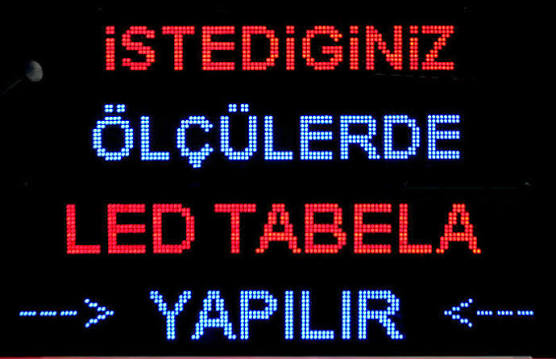
A scrolling text LED sign is a programmable digital sign where the text moves across the screen from right to left (or left to right). Unlike traditional fixed signs, you can change the message any time — no need to print a new sign, stick a sticker, or unmount the sign. This is why scrolling text LED signs are one of the most practical and economical solutions for restaurants, cafés, pharmacies, stores, and gas stations.
In this guide, we'll walk you through everything step by step: what a scrolling text LED sign is, how it works, the difference from programmable LED signs, scrolling text prices in 2026, available sizes, how to program scrolling text, and how to choose the right manufacturer.
This is not an advertisement — it's a practical guide. At the end, if you find that Okan Urla suits you, there's a link. If not, you've learned how to choose another manufacturer wisely.
📜 1. What Is a Scrolling Text LED Sign?
A scrolling text LED sign is a digital sign made of LED modules, where the text continuously moves across the screen. The text slides from right to left, so messages longer than the screen can still be displayed. This feature is ideal for dynamic content like menus, price lists, campaign announcements, and event information.
Difference Between Scrolling Text and Fixed Sign
| Criterion | Fixed Sign | Scrolling Text LED Sign |
|---|---|---|
| Content change | Requires reprint | Changeable instantly |
| Cost (long-term) | New cost with each change | One-time investment |
| Night visibility | Requires lighting | Has its own light |
| Dynamic content | None | Yes (scrolling, flashing, effects) |
| Usage | Brand name, logo | Menu, campaign, price, announcement |
🔧 2. How Does a Scrolling Text LED Sign Work?
A scrolling text LED sign consists of several core components. Understanding how it works helps you choose the right product:
2.1. Core Components
| Component | Function |
|---|---|
| LED Module | LED lamps that form the text (P10, P5, etc.) |
| Control Card | Manages which LED lights up and when, and how the text flows |
| Memory | Stores messages and programs |
| Connectivity | Programmed via USB, WiFi, Bluetooth, or Ethernet |
| Power Supply | Provides electricity to the system |
| Remote | Remote control (optional) |
2.2. How Does the Text Flow?
The control card takes the text from memory and sends it to the LED modules line by line. Each time, it shifts one pixel, making the text move. Speed, direction (right-to-left / left-to-right), effect (scrolling, flashing, fade), and color are set via the control card.
💻 3. Programmable LED Signs — What's the Difference from Scrolling Text?
Programmable LED signs and scrolling text LED signs often mean the same thing, but they're not exactly identical:
3.1. Programmable LED Signs
Covers any kind of LED sign whose message can be changed via software. The content can be text, graphics, animation, or video.
3.2. Scrolling Text LED Signs
They're a sub-type of programmable LED signs. Usually they display one or two lines of text, and the text scrolls continuously. The screen is smaller, doesn't show video, only text and simple animation.
3.3. Which Suits You?
| Need | Scrolling Text | Programmable (Full) |
|---|---|---|
| Menu, price, campaign announcement | ✅ Ideal | ✅ Suitable |
| Video playback | ❌ None | ✅ Yes |
| Graphics, logo animation | Limited | ✅ Yes |
| Cost | More economical | Higher |
| Ease of use | Simple | More complex |
📏 4. Scrolling Text LED Sign Sizes
Scrolling text signs are produced in different sizes depending on usage. The most common sizes:
| Size (pixels) | Physical Size (P10) | Lines | Usage |
|---|---|---|---|
| 32x64 | ~32 × 64 cm | 1 line | Small storefront, café |
| 32x128 | ~32 × 128 cm | 1 line | Restaurant menu |
| 64x128 | ~64 × 128 cm | 2 lines | Most common — store, pharmacy |
| 64x192 | ~64 × 192 cm | 2–3 lines | Large storefront, street |
| 96x192 | ~96 × 192 cm | 3+ lines | Plaza, gas station |
Tip: If you're only displaying text, 32x128 or 64x128 is usually enough. To display long messages in a single line, 32x192 is also an option.
🎨 5. Color and Effect Options
In scrolling text LED signs, color and effect are the easiest way to reflect your brand identity:
5.1. Color Options
- Single color (mono): Red, green, blue, yellow, white. Most economical and most common.
- Two-color: Combination of two colors (e.g., red + green).
- RGB (full color): 16 million colors. For premium brands.
5.2. Effect Options
- Scroll: Text flows from right to left
- Flash: Text blinks
- Fade: Text appears with a soft transition
- Static: Text stays fixed
- Enter/exit: Text enters the screen, then exits
💰 6. Scrolling Text Prices 2026
Scrolling text LED sign prices vary depending on size, color, module type, and control card. The table below shows estimated FOB Turkey prices — always request a current quote for exact pricing.
6.1. Factors Affecting Price
- Size: Larger sign = higher price
- Color: Single color (economical) vs RGB (expensive)
- Module type: P10 (economical) vs P5 (expensive)
- Control card: Simple vs WiFi/cloud
- Casing: Plastic vs aluminum
- Installation: Included or not?
6.2. Sample Price Table (Estimated, 2026)
| Size | Single Color | Two Colors | RGB |
|---|---|---|---|
| 32x64 | $80 – $150 | $120 – $200 | $180 – $280 |
| 32x128 | $150 – $250 | $220 – $320 | $300 – $420 |
| 64x128 | $280 – $450 | $380 – $550 | $500 – $750 |
| 64x192 | $420 – $650 | $550 – $800 | $750 – $1,100 |
| 96x192 | $650 – $950 | $850 – $1,200 | $1,100 – $1,600 |
Note: Prices are FOB Turkey. Shipping, customs, and installation are excluded.
💻 7. How to Program Scrolling Text?
How to program scrolling text is one of the most frequently asked questions. Here are the steps:
7.1. Programming Methods
- USB: Connect to a computer and program via software (most common)
- WiFi: Program wirelessly via phone or computer
- Bluetooth: Program via mobile app from a short distance
- Ethernet: Centralized programming via network cable (large systems)
- Cloud: Remote programming via the internet (premium)
7.2. Programming Steps
- Download the software: Download the manufacturer's software (usually Windows)
- Connect the sign: Connect the sign to the computer via USB or WiFi
- Enter the text: Type the text in the software window
- Choose the effect: Scrolling, flashing, static, etc.
- Set the speed: Determine the text flow speed
- Choose the color: (in RGB signs) choose color and effect
- Upload: Press "Send" or "Upload" to upload the text to the sign
- Test: Verify the text flows correctly
7.3. Programming Tips
- Short messages: Long texts may crowd the screen; short and concise messages are more effective
- Large font: Use a large font for messages read from a distance
- Moderate speed: Very fast text can't be read; choose a moderate speed
- Contrast: Ensure colors contrast with the background
- Ordering: Display multiple messages in sequence
🏪 8. Scrolling Text LED Sign Use Cases
Scrolling text LED signs are used in almost every sector. The most common uses:
- Restaurants and Cafés: Menu, daily special, price list, campaign
- Pharmacies: On-duty pharmacy info, campaign, health warning
- Stores: Discounts, campaigns, new product announcement
- Gas Stations: Price updates (double-sided)
- Salons and Beauty Centers: Campaign, service list
- Hotels: Welcome message, event announcement
- Wedding Halls: Welcome, program schedule
- Factories: Safety warning, shift information
✅ 9. How to Choose the Right Scrolling Text LED Sign? (Checklist)
- ☐ Determine the purpose: Menu, campaign, announcement?
- ☐ Choose the size: 32x64, 32x128, 64x128?
- ☐ Color: Single color, two-color, RGB?
- ☐ Programming method: USB or WiFi?
- ☐ Effect options: Scroll, flash, static?
- ☐ Remote: Do you need a remote control?
- ☐ Request a physical sample (not a photo)
- ☐ Ask about warranty and service
- ☐ Get a written quote (from 3–5 companies)
- ☐ Is installation included? Clarify this
❓ 10. Frequently Asked Questions
Can scrolling text LED signs be programmed?
Yes. Most scrolling text signs can be programmed via USB, WiFi, or Bluetooth. You can change the message any time.
How many messages can be stored in a scrolling text sign?
Depending on the control card, 100–1,000 messages can be stored. Some models are unlimited (with memory card).
Can I program the scrolling text sign from my phone?
Yes, models with WiFi or Bluetooth support can be programmed via mobile app.
Can video be played on a scrolling text sign?
No, scrolling text signs usually only display text and simple animation. For video, you need a full programmable LED screen.
How much electricity does a scrolling text sign consume?
A 64x128 P10 sign running 10 hours a day consumes about 15–30 kWh per month.
What is the lifespan of a scrolling text sign?
LED modules run for 50,000–100,000 hours. At 10 hours daily use, that's 13–27 years.
Is there a warranty on scrolling text signs?
Serious manufacturers offer 2 years of warranty. Some offer 3–5 years.
Can I install a scrolling text sign myself?
For small sizes (32x64) it's possible, but for larger sizes (64x128+) professional installation is recommended.
🚀 11. Summary: 5 Critical Steps for Choosing Scrolling Text
- Determine the need: Menu, campaign, announcement?
- Choose the size and color
- Get written quotes from 3–5 manufacturers
- Request a physical sample — not a photo
- Test after installation: Does the text flow, is the speed right?
Okan Urla — Scrolling Text LED Sign Manufacturing
Scrolling text LED signs manufactured to custom sizes. Single-sided/double-sided, multiple color options, ready for delivery.
📱 Get a Quote on WhatsApp 📸 Follow on Instagram ✉️ Send an Email— This guide is part of the "LED Sign Guide" series — a series of articles aimed at helping businesses choose the right scrolling text LED sign.
Comments (0)
Leave a Comment
You must login to comment.
No comments yet. Be the first to comment!